 OfflineStatement
Combine bank statements into one spreadsheet
Drop all your monthly statement PDFs at once and get one table: every transaction, the statement it came from, and each statement's running balance checked. Download it as Excel, CSV, QuickBooks, Xero or OFX. Combining is part of Pro; the free version converts one statement at a time, so you can try your bank's format first. The PDFs are read in your browser and never uploaded.
 Drop statement PDFs hereor click to choose filesTap to choose a statement PDF
Free: 3 statements a day, no sign-up.
Bank not supported yet? Email the bank name and country to [email protected] and we'll add it. No need to send your statement.
How your statement stays private
- Your PDFPick a statement from your computer or phone.
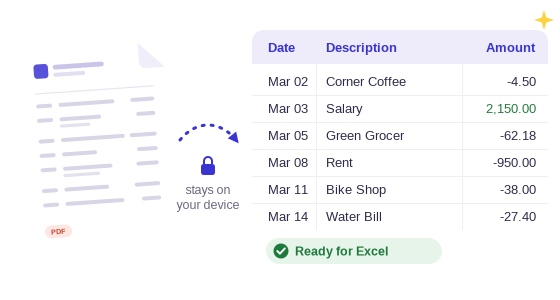
- Read in this tabThis page reads it on your device and never sends the file anywhere. Turn off your wifi after the page loads and it still works.
- Your spreadsheetThe rows go straight into a file in your downloads.
Works with most banks
Reads text-based PDF statements with debit/credit or single-amount columns, in US, UK, European, Indian and Indonesian number formats. Password-protected e-statements work too, and the password stays on your device.
Checked, not guessed
Every statement gets a running-balance check: if a row doesn't add up to the printed balance, we highlight it, so nothing goes into your books wrong.
Hours of typing, done in a minute
Free: preview every transaction and download the first 25 as a CSV.
Pro: every transaction, a year of statements in one file, Excel, QuickBooks, Xero and OFX. See pricing
When one file helps
- Tax returns and year-end: twelve monthly PDFs become one list you can filter, total or send to your accountant.
- Catching up on bookkeeping: import a quarter or a whole year into QuickBooks or Xero in one go, instead of one upload per month.
- More than one account: a checking account and a credit card, or two banks, end up in the same sheet, and the File column tells them apart.
- Older months: most banks only let you download a CSV of recent activity, but your monthly PDF statements go back years.
How to combine them
- Download each month's statement PDF from your bank. Not sure where? Find your bank's guide.
- Select all of them in the box at the top of this page, or drag them in together. A password-protected PDF asks for its password when its turn comes.
- Look over the result. Each statement's running balance is checked on its own, and any row that doesn't add up is highlighted.
- Download one file: Excel (.xlsx), CSV, a QuickBooks or Xero CSV, or OFX.
What the combined spreadsheet looks like
The first column, File, names the PDF each row came from. After it come Date, Description, the money out and money in columns (or a single Amount), and Balance, depending on what your statements print. Rows are kept statement by statement, each in the order it was printed. If two statements print different columns, the sheet has all of them and leaves a cell blank where a statement had nothing.
Statement periods sometimes overlap, so a few days can appear on two statements. When the statements print a running balance, a row with the same date, description, amount and balance as one already in the file is kept once, and the result tells you how many were skipped.
Pro also adds a Category column with a first guess for each row (Groceries, Fuel, Utilities, Salary & income, Taxes, Fees & charges and others), worked out on your device from the description. Rows it can't place are left blank for you to fill in.
Free or Pro
Free: one statement at a time, up to 3 a day, the balance check, and a CSV of the first 25 transactions. Pro costs $7 a month or $59 a year, both with a 7-day free trial, and combines a batch of statements into one file in any of the formats above.
FAQ
Can I combine statements from different banks?
Yes. Drop them together. The File column shows which statement each row came from, and columns one bank prints but another doesn't are left blank for the other bank's rows.
Does it combine credit card statements too?
Yes. Card statements without a running balance are combined the same way, but overlapping rows can't be matched without a balance, so check the days where two statements meet.
Can I combine statements for free?
No. The free version converts one statement at a time. Combining a batch into one file is part of Pro, which starts with a 7-day free trial.
Is anything uploaded?
No. Every PDF is read by code running in your browser, so your statements stay on your device.