 OfflineStatement
Credit card statement to CSV or Excel
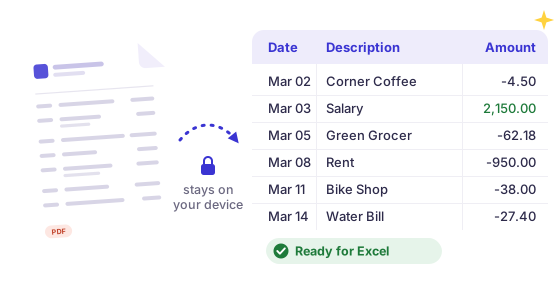
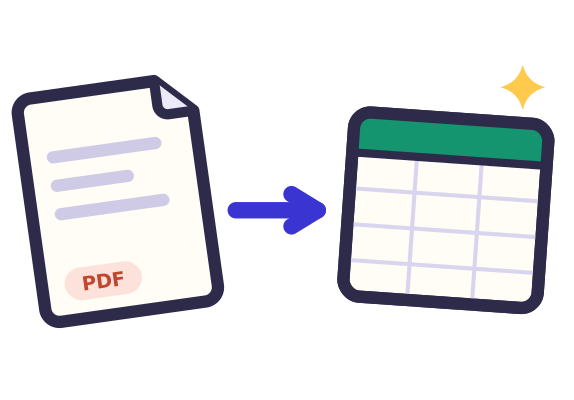
Drop a credit card statement PDF and get a spreadsheet of every charge, refund and payment with its date and merchant. Card statements without a running balance work too. The PDF is read in your browser and never uploaded.
 Drop statement PDFs hereor click to choose filesTap to choose a statement PDF
Free: 3 statements a day, no sign-up.
Bank not supported yet? Email the bank name and country to [email protected] and we'll add it. No need to send your statement.
How your statement stays private
- Your PDFPick a statement from your computer or phone.
- Read in this tabThis page reads it on your device and never sends the file anywhere. Turn off your wifi after the page loads and it still works.
- Your spreadsheetThe rows go straight into a file in your downloads.
Works with most banks
Reads text-based PDF statements with debit/credit or single-amount columns, in US, UK, European, Indian and Indonesian number formats. Password-protected e-statements work too, and the password stays on your device.
Checked, not guessed
Every statement gets a running-balance check: if a row doesn't add up to the printed balance, we highlight it, so nothing goes into your books wrong.
Hours of typing, done in a minute
Free: preview every transaction and download the first 25 as a CSV.
Pro: every transaction, a year of statements in one file, Excel, QuickBooks, Xero and OFX. See pricing
First, check your card's own CSV download
Most US card issuers let you download recent transactions as a CSV on their website. If that covers the dates you need, it's the quickest way:
- Chase: on chase.com, the download arrow above the card's activity list (not under Statements). Not in the app. Full steps
- American Express: Statements & Activity, then the download arrow; CSV or Excel. Recent activity and the past six statements. Full steps
- Capital One: the Statements & documents menu, then Download transactions; CSV with separate Debit and Credit columns. Full steps
- Citi: the download icon at the top right of the card's transactions; CSV, often up to about two years back. Full steps
- Bank of America: Download above the card's activity list; CSV or Excel format, for a limited time back. Full steps
- Wells Fargo: Download Account Activity, then Comma Delimited; card history only 90 days or 300 transactions. Full steps
- Apple Card: Wallet on iPhone: Card Balance, then Export Transactions; or card.apple.com, Statements, Export Transactions. Full steps
Menu names change from time to time, and these downloads only reach back a few months to a couple of years. For older months, a whole tax year, or a statement someone emailed you, convert the PDF statement in the box above.
What the CSV looks like
Each charge, refund, fee and payment becomes one row with its date, the merchant or description, and the amount. Card statements rarely print a running balance, so the CSV has Date, Description and Amount columns, with amounts signed the way the statement prints them. Statements that split money out and money in into two columns keep them as Debit and Credit.
Open it in Excel or Google Sheets
Excel: double-click the CSV, or use Data > From Text/CSV. Google Sheets: File > Import > Upload. Pro also exports Excel .xlsx, QuickBooks and Xero CSV files and an OFX bank file.
Card guides: Chase · American Express · Capital One · Citi · Bank of America · Wells Fargo · Apple Card · Discover · Any bank
Card issuer names on this site are trademarks of their respective owners. OfflineStatement is an independent tool by Tofu Labs and is not affiliated with, endorsed by or sponsored by any of them.
FAQ
My card statement has no balance column. Does it work?
Yes. Each transaction's date, description and amount are read even when there's no running balance.
How are charges and payments signed?
Amounts keep the sign printed on the statement: on most cards, charges are positive and payments or refunds negative, so a SUM gives the new balance change.
Why does my card's own CSV download stop after a few months?
Card issuers only keep recent activity in their download tool: Wells Fargo says 90 days or 300 transactions for cards, Amex the past six statements. Your monthly PDF statements go back years, so for older months convert those PDFs here.
Does it work for store cards like the Amazon Store Card or Barclays cards?
Yes. The Amazon Store Card (issued by Synchrony) and Barclays US cards come out as Date, Description, Amount. Reference codes and points columns are left out of the description, and the promotional financing table at the end is not counted as transactions.
Can I convert a year of card statements at once?
Yes, with Pro: drop all twelve PDFs and get one CSV or Excel file, with transactions that appear on two overlapping statements dropped. The free version converts one statement at a time.
Is my statement uploaded?
No. Everything runs in your browser.