 OfflineStatement
Scotiabank statement PDF to CSV
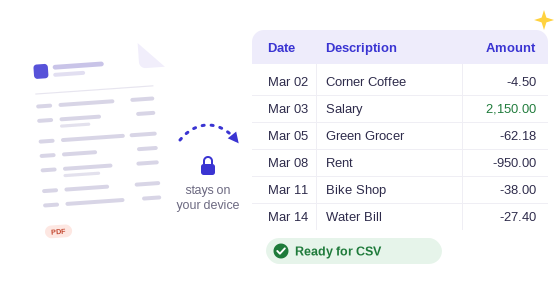
Drop a Scotiabank statement PDF and get a spreadsheet of dates, transactions, amounts withdrawn, amounts deposited and balances. The PDF is read in your browser and stays on your device.
 Drop statement PDFs hereor click to choose filesTap to choose a statement PDF
Free: 3 statements a day, no sign-up.
Bank not supported yet? Email the bank name and country to [email protected] and we'll add it. No need to send your statement.
How your statement stays private
- Your PDFPick a statement from your computer or phone.
- Read in this tabThis page reads it on your device and never sends the file anywhere. Turn off your wifi after the page loads and it still works.
- Your spreadsheetThe rows go straight into a file in your downloads.
Works with most banks
Reads text-based PDF statements with debit/credit or single-amount columns, in US, UK, European, Indian and Indonesian number formats. Password-protected e-statements work too, and the password stays on your device.
Checked, not guessed
Every statement gets a running-balance check: if a row doesn't add up to the printed balance, we highlight it, so nothing goes into your books wrong.
Hours of typing, done in a minute
Free: preview every transaction and download the first 25 as a CSV.
Pro: every transaction, a year of statements in one file, Excel, QuickBooks, Xero and OFX. See pricing
How to download your Scotiabank statement as a PDF
- Sign in to Scotia OnLine or the Scotiabank app.
- Choose the account and open its statements section (look for Statements or eStatements). Menu names change from time to time.
- Select the statement period and download the PDF.
Then drop the PDF in the box above, or click it to choose the file.
What you get
Scotiabank account statements typically list Date, Transactions, Amounts withdrawn ($), Amounts deposited ($) and Balance ($), with dates such as Sep 4 and no year. The converter recognises those headings even with ($) after them, so Amounts withdrawn becomes Debit and Amounts deposited becomes Credit, and it reads amounts with comma thousands such as 1,250.00. Dates are kept as printed in the free CSV; the Pro QuickBooks, Xero and OFX exports turn them into full dates, taking the year from the statement. Amounts printed with a plain $ are read as Canadian dollars, so the currency menu is already set to CAD for an OFX export. For an account held in U.S. dollars, switch it to USD first.
Scotia OnLine can also download recent transactions. When that covers the dates you need, it is the simplest route. The converter is for the PDF statements, such as older months or files someone sent you.
How it works, and what it can't do
OfflineStatement is a general reader for text-based PDF statements: it finds the transaction table by its column headings and turns each dated row into a spreadsheet row. It was not built with or tested by Scotiabank, and statement layouts change, so check the result against the PDF. Where the statement prints a running balance, every row is checked against it and rows that don't add up are highlighted. Scanned or photographed statements (images, not text) are not supported. Password-protected PDFs work: you type the password and it stays on your device.
Open the CSV in Excel, Google Sheets or QuickBooks
Excel: double-click the CSV, or use Data > From Text/CSV. Google Sheets: File > Import > Upload, then choose the CSV. QuickBooks Online: the bank-upload CSV needs Date, Description and Amount; Pro exports exactly that format (see PDF to QuickBooks), or you can trim the free CSV to those columns.
Other bank guides: Chase · Bank of America · Wells Fargo · Capital One · American Express · Citi · U.S. Bank · PNC · TD Bank · Discover · Apple Card · Truist · Navy Federal · HSBC UK · Barclays · Lloyds · NatWest · Santander UK · Monzo · Halifax · Nationwide · Starling · TSB · first direct · RBC Royal Bank · TD Canada Trust · CommBank · Westpac · ANZ · NAB · BMO · CIBC · SBI · HDFC Bank · ICICI Bank · Axis Bank · Kotak · PNB · Bank of Baroda · Canara Bank · Union Bank of India · IDFC FIRST Bank · Yes Bank · Indian Bank · IDBI Bank · UCO Bank · Bank of Maharashtra · South Indian Bank · Bandhan Bank · IndusInd Bank · Federal Bank · Bank of India · Central Bank of India · FNB · Capitec · Absa · Standard Bank · Bank of Ireland · AIB · Maybank · DBS / POSB · OCBC · UOB · Any bank
Scotiabank and the other bank names on this site are trademarks of their respective owners. OfflineStatement is an independent tool by Tofu Labs and is not affiliated with, endorsed by or sponsored by any bank.
FAQ
Is this a Scotiabank service?
No. OfflineStatement is independent and not affiliated with or endorsed by The Bank of Nova Scotia.
What happens with an overdrawn balance?
The converter reads a minus sign and the suffixes CR, DR and OD. If your statement marks an overdrawn balance some other way, that balance is read as positive and the balance check highlights the row, so check highlighted rows against the PDF.
Is my statement uploaded?
No. The PDF is read by code running in your browser. There is no server that receives your file, and you can disconnect from the internet after the page loads. Pro checks your license about once a day when you're online and keeps working offline in between.
Is it free?
Previewing a statement and downloading a CSV of its first 25 transactions is free. Pro gives you every transaction, batches of statements, Excel .xlsx and QuickBooks, Xero and OFX files.