 OfflineStatement
UCO Bank statement PDF to Excel
Drop a UCO Bank statement PDF and get a spreadsheet of dates, particulars, withdrawals, deposits and balances. The PDF is read on your device; there is no upload.
 Drop statement PDFs hereor click to choose filesTap to choose a statement PDF
Free: 3 statements a day, no sign-up.
Bank not supported yet? Email the bank name and country to [email protected] and we'll add it. No need to send your statement.
How your statement stays private
- Your PDFPick a statement from your computer or phone.
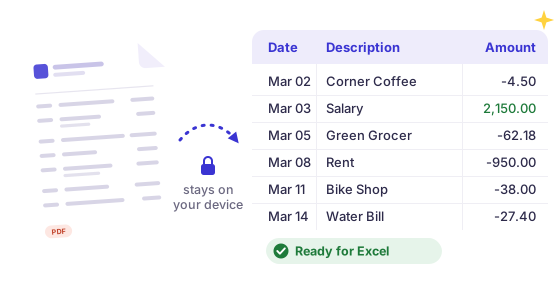
- Read in this tabThis page reads it on your device and never sends the file anywhere. Turn off your wifi after the page loads and it still works.
- Your spreadsheetThe rows go straight into a file in your downloads.
Works with most banks
Reads text-based PDF statements with debit/credit or single-amount columns, in US, UK, European, Indian and Indonesian number formats. Password-protected e-statements work too, and the password stays on your device.
Checked, not guessed
Every statement gets a running-balance check: if a row doesn't add up to the printed balance, we highlight it, so nothing goes into your books wrong.
Hours of typing, done in a minute
Free: preview every transaction and download the first 25 as a CSV.
Pro: every transaction, a year of statements in one file, Excel, QuickBooks, Xero and OFX. See pricing
How to download your UCO Bank statement as a PDF
- In the UCO mBanking Plus app, go to Banking > My Accounts > Account Statement, then pick the account and the period. UCO Bank gives this path on its own help page.
- Or log in to UCO Bank internet banking, or open the UCO mPassbook app, and download the statement there.
- Save the statement as a PDF.
Then drop the PDF in the box above, or click it to choose the file.
What you get
UCO Bank statements usually print Date, Particulars, Withdrawals, Deposits and Balance, with dates such as 08-Sep-2026 and an Opening Balance line at the top. UPI particulars often wrap onto a second line that ends with a reference and a time, such as 503958281073/08-09-26 17:45:02. The converter joins both lines into one description, so that second line is never mistaken for a new transaction. Round amounts that UCO prints without paise, such as 2400 or a balance of 3700, are read as amounts too. It keeps the opening balance as a balance line, never as money in, and checks every row against the running balance.
If the bank's own download covers the period you need as a spreadsheet, use it. The converter is for the PDFs: emailed statements, older periods, or a statement someone sent you for a loan or rental file.
How it works, and what it can't do
OfflineStatement is a general reader for text-based PDF statements: it finds the transaction table by its column headings and turns each dated row into a spreadsheet row. It was not built with or tested by UCO Bank, and statement layouts change, so check the result against the PDF. Where the statement prints a running balance, every row is checked against it and rows that don't add up are highlighted. Scanned or photographed statements (images, not text) are not supported. Password-protected PDFs work: you type the password and it stays on your device.
Open the CSV in Excel, Google Sheets or QuickBooks
Excel: double-click the CSV, or use Data > From Text/CSV. Google Sheets: File > Import > Upload, then choose the CSV. QuickBooks Online: the bank-upload CSV needs Date, Description and Amount; Pro exports exactly that format (see PDF to QuickBooks), or you can trim the free CSV to those columns.
Other bank guides: Chase · Bank of America · Wells Fargo · Capital One · American Express · Citi · U.S. Bank · PNC · TD Bank · Discover · Apple Card · Truist · Navy Federal · HSBC UK · Barclays · Lloyds · NatWest · Santander UK · Monzo · Halifax · Nationwide · Starling · TSB · first direct · RBC Royal Bank · TD Canada Trust · Scotiabank · CommBank · Westpac · ANZ · NAB · BMO · CIBC · SBI · HDFC Bank · ICICI Bank · Axis Bank · Kotak · PNB · Bank of Baroda · Canara Bank · Union Bank of India · IDFC FIRST Bank · Yes Bank · Indian Bank · IDBI Bank · Bank of Maharashtra · South Indian Bank · Bandhan Bank · IndusInd Bank · Federal Bank · Bank of India · Central Bank of India · FNB · Capitec · Absa · Standard Bank · Bank of Ireland · AIB · Maybank · DBS / POSB · OCBC · UOB · Any bank
UCO Bank and the other bank names on this site are trademarks of their respective owners. OfflineStatement is an independent tool by Tofu Labs and is not affiliated with, endorsed by or sponsored by any bank.
FAQ
Is this a UCO Bank tool?
No. OfflineStatement is independent and not affiliated with or endorsed by UCO Bank.
What is the password for a UCO Bank statement PDF?
It is set by the bank, not by us, and the email that brings the statement explains it. You type it in this page and it stays on your device.
Is my statement uploaded?
No. The PDF is read by code running in your browser. There is no server that receives your file, and you can disconnect from the internet after the page loads. Pro checks your license about once a day when you're online and keeps working offline in between.
Is it free?
Previewing a statement and downloading a CSV of its first 25 transactions is free. Pro gives you every transaction, batches of statements, Excel .xlsx and QuickBooks, Xero and OFX files.